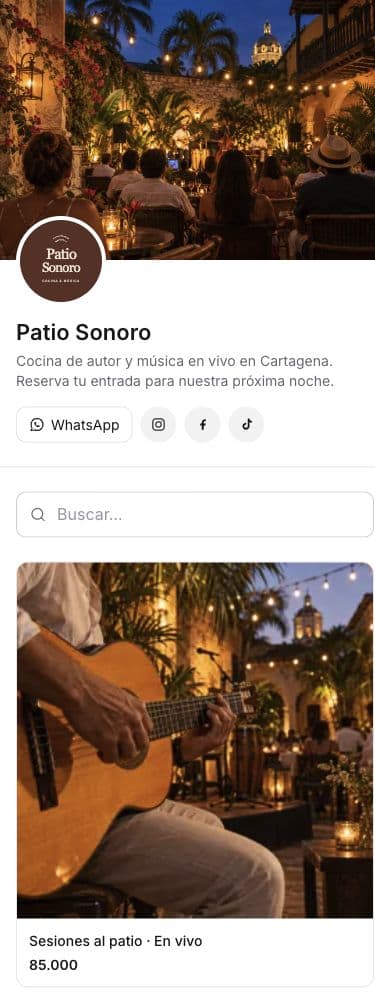
General admission, VIP and moreCapacity per ticket typeIndividual ticket codes
Real product. Demonstration businesses and data.
ONE LINK. EVERY WAY TO CONNECT.
Your WhatsApp, email and socials. All in your catalog.
Add your catalog to your Instagram bio or your ads. From that same link, customers can explore your offer, buy, contact you on WhatsApp or email, and visit your social profiles.
From the first shared link to your next order. One place to manage your business.
A page for every event
Cover image, photos, description, date and venue. Everything customers need to know before buying.
Different ticket types
Use variants for General Admission, VIP or your own categories. Set a price and stock limit for each one.
Capacity under control
The server checks stock before accepting a purchase. Sold-out tickets are no longer available.
One purchase journey
Customers choose tickets, fill in their details and buy without creating an account. Connect your own Bold payment account.
Individual codes
Each ticket has its own code. Buyers can find their codes on the order tracking page.
After the sale
Review orders and customers and export tickets with Pro. Past events stop selling and disappear from the public catalog.
Your identity, your link
Your name, logo, cover and accent color make your catalog yours. Add your description, address and contact links, then share your own URL.
Customers with a history
Every purchase builds your customer list. Contact details, order counts and history without copying information by hand.
Discounts you can track
Percentage or fixed-amount codes, minimum spend, validity dates and usage limits. One active code on Free; unlimited on Pro.
A dashboard for your numbers
Sales, orders and visits. Pro adds charts, period comparisons, best sellers and exports.
Status in one link
Buyers can return to their order or booking link to check the latest status and details.
Emails with your identity
Buyer confirmations featuring your business name and logo, and new order notifications for you.
Up to three catalogs
Manage up to three catalogs in one account with Pro. Each keeps its own orders, customers and settings.
Spanish and English
Choose your catalog interface language. Names and descriptions appear exactly as you write them.
Ready to share and discover
Mobile layouts, sharing metadata, structured product information for search engines and a sitemap.
Visibility at your pace
Keep items as drafts, hide the collection or pause your catalog. You decide when it is available.
Everything in its category
Organize products, services or events into categories so customers can easily find what they need.
From your business to its next customer.
01
Make it yours
Choose your catalog type. Add your name, logo, cover image and business information.
02
Publish what you offer
Upload photos, set prices and choose how customers buy products, book appointments or get tickets.
03
Share your link
Add it to your bio, send it on WhatsApp or use it in your ads. Your catalog is ready to welcome customers.
Before your first step.
Can I sell General Admission and VIP tickets?
Yes. They are variants of the same event, each with its own price and stock.
Does the buyer get a code for every ticket?
Yes. Individual codes are generated and can be viewed from the order tracking page.
Does it include a QR scanner or entrance validation?
It currently includes ticket codes and exports. It does not include a QR scanner or an entrance validation app.
What happens after the event date?
The event stops selling and disappears from the public catalog. Your orders and history stay in your dashboard.
Can I start without paying?
Yes. Free includes one catalog, up to 10 published items, unlimited orders and one active discount code. You can connect online payments on the free plan.
Can I have all three catalog types?
Pro lets you manage up to three catalogs in one account. Each catalog sells products, services or event tickets, with its own customers, orders and settings.
Three ways to sell. One place to start.
Choose the catalog that fits what you do. Each has its own buying experience.